
If you have sent your cryptocurrency payment but your invoice is still marked as Unpaid, do not worry. In most cases, this can be resolved quickly using the built in transaction verification tool.
Follow the steps below to verify your payment.
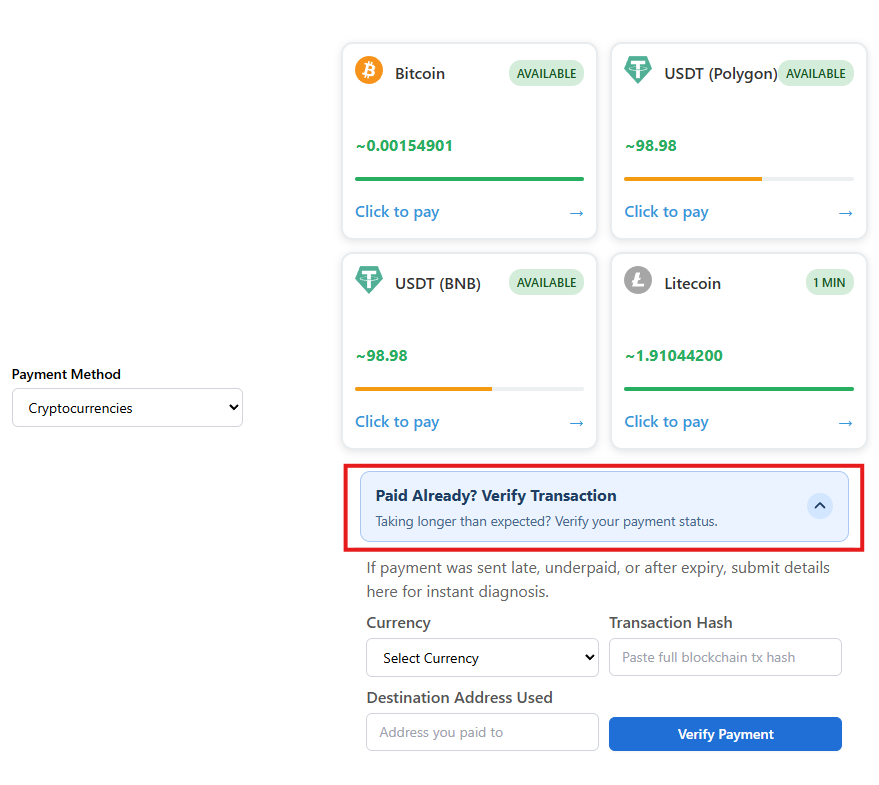
Step 1: Open the Invoice
Log in to your client area and open the unpaid invoice.
Scroll down to the cryptocurrency payment section where you selected your coin.
You will see an option labeled:
Paid Already? Verify Transaction
Click this toggle to expand the verification form.
Step 2: Enter Your Payment Details
Once expanded, you will see the following fields:
-
Currency – Select the cryptocurrency you used (BTC, USDT, LTC, etc.)
-
Transaction Hash – Paste your full blockchain transaction ID (TXID)
-
Destination Address Used – Enter the wallet address you sent payment to
After filling in all fields, click:
Verify Payment
What Happens Next?
The system will automatically check the blockchain.
You will receive one of the following outcomes:
Payment Confirmed
-
Your invoice will be marked as Paid automatically.
-
Services will be activated immediately.
Payment Issue Detected
If there was a problem, such as:
-
Underpayment
-
Payment sent after invoice expiry
-
Transaction not found
The system will show the reason.
You will also have the option to automatically open a support ticket with the transaction details pre filled, so our billing team can assist you quickly.
Important Tips
-
Make sure you select the correct network when sending USDT or other tokens.
-
Always copy and paste the full transaction hash from your wallet.
-
Wait for at least three network confirmation before verifying.